
Website not showing on Google or Bing?
You’ve launched your website, everything seems to be working, but search engines don’t seem to know it exists.
You can open your website, share its address with others and view it on your phone. Yet when you try to find it through a search engine, there’s no sign of it.
Google and Bing need to find your website, read its content and add it to their databases. This is called indexing.
The most common reasons are that your website is new, search engines haven’t indexed it yet, a website setting is blocking them, or a technical problem is preventing access.
If your website hasn’t been indexed, it generally won’t appear in normal search results.
Here’s how to find out what might be happening and what you can do about it.
On this page
- Your website is new
- Your website is blocking search engines
- Google or Bing can’t access your website
- Your website has redirect problems
- Check whether your website is indexed
- Help Google and Bing index your website
- Frequently asked questions
- Useful resources
- Need help?
Your website is new
A website not showing on Google or Bing is quite common when it’s newly published. Search engines might simply not have discovered it yet.
Search engines use automated programs to explore the internet and find websites. They don’t necessarily find every new website straight away.
How long does indexing take?
There’s no guaranteed timeframe.
A new website might be discovered within a few days, but indexing can take several weeks or longer.
If your website has only been online for a short time, there might not be a problem.
However, if several weeks have passed and neither Google nor Bing has indexed your website, it’s worth checking whether something is preventing them from accessing it.
Your website is blocking search engines
Sometimes a website is accidentally set up to prevent search engines from indexing it.
This commonly happens when a website is being built. The person developing it might temporarily block search engines until it’s ready to launch.
Problems can arise when those settings aren’t changed after the website goes live.
Check your WordPress settings
If your website uses WordPress, there’s a simple setting you can check.
- Log in to your WordPress dashboard.
- Go to Settings, then Reading.
- Find Search Engine Visibility.
- Look for the option labelled ‘Discourage search engines from indexing this site’.
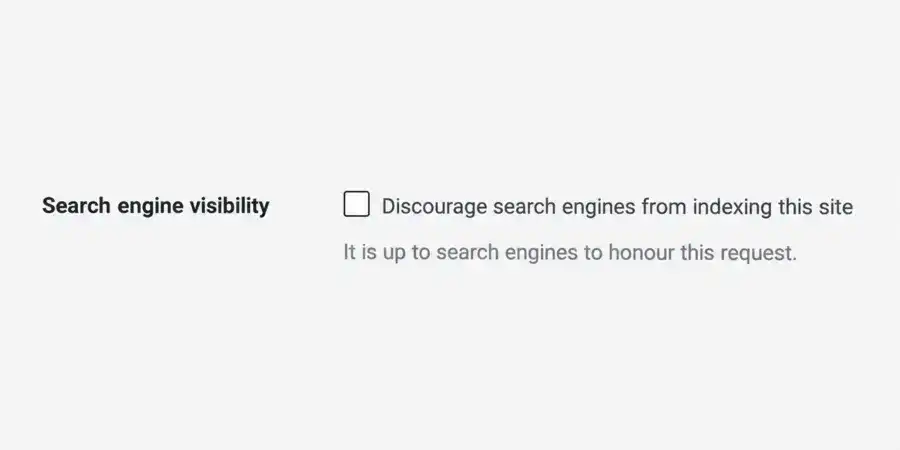
If your website is live and should appear on Google and Bing, this box should be unticked.
If it’s selected, untick it and save your changes.
In WordPress, go to Settings → Reading. The ‘Discourage search engines from indexing this site’ box should be unticked for a live website.
WordPress SEO plugins can also contain settings that prevent indexing. You might come across terms such as noindex or robots.txt.
These are instructions that control whether search engines can access or include parts of your website.
If you’re unsure what these settings do, it’s best to have them checked before making changes.
Google or Bing can’t access your website
Even if your website works when you open it, search engines might have trouble accessing it.
There are several possible reasons.
Unreliable website hosting
If your website is frequently unavailable because of unreliable hosting, Google and Bing may have trouble accessing it.
Repeated or prolonged outages can interfere with search engines checking and indexing your website.
Password protection
Websites are sometimes protected by a password during development.
If that protection is still active after launch, search engines generally won’t be able to read the website.
Security settings
Website security tools help protect your website from unwanted visitors and suspicious activity.
However, incorrect settings can sometimes block Google or Bing from accessing your website.
If this happens, you may need to check your website’s security settings or ask someone familiar with website security to investigate.
Your website has redirect problems
A redirect automatically sends someone from one website address to another.
For example, if you change your domain name, people entering the old website address can be automatically redirected to the new one.
Redirects are normal, but problems can occur when they’re configured incorrectly.
Common problems include:
- An old domain pointing to the wrong website.
- Visitors being repeatedly redirected between addresses.
- A new website accidentally redirecting back to the old one.
- A website move that hasn’t been completed correctly.
These problems can make it difficult for Google and Bing to find and index the intended website.
If you’ve recently changed your domain name or moved your website to another hosting provider, redirects are worth checking.
Website Not Showing on Google? Check If It’s Indexed
If your website is not showing on Google or Bing, the first step is to check whether search engines have actually indexed it.
Try a simple search
Open Google and enter:
site:yoursitename.com
Replace yoursitename.com with your own website address.
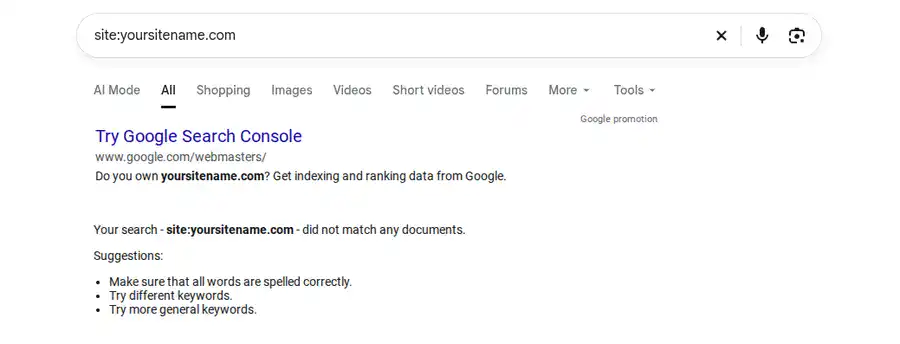
Try the same search in Bing.
Example of a Google site search returning no results. This doesn’t always mean the website isn’t indexed.
If your website appears, it’s a sign that the search engine has indexed it.
If nothing appears, it might not be indexed. However, this search isn’t completely reliable, so it’s worth checking using the official webmaster tools.
Google Search Console
Google Search Console is a free service that helps website owners understand how Google sees their websites.
Once you’ve added and verified your website, you can use the URL Inspection tool.
Enter your homepage address to check whether Google has indexed it.
If it hasn’t, Search Console may explain why.
Bing Webmaster Tools
Bing Webmaster Tools provides a similar free service for Bing.
Once your website has been added and verified, you can use its URL Inspection tool to check whether your homepage is indexed and whether Bing has encountered any problems.
Both services are free and useful for anyone who owns or manages a website.
How to help Google and Bing index your website
If your website hasn’t been indexed, there are a few steps you can take to help search engines discover it.
Submit your sitemap
A sitemap is a file containing a list of important addresses on your website.
Think of it as a map that helps search engines find their way around.
Most WordPress SEO plugins can automatically create a sitemap for your website. Some plugins can also notify supported search engines when your website is updated.
You can submit your sitemap directly through Google Search Console and Bing Webmaster Tools.
Request indexing
Both services also allow you to submit website addresses for indexing.
For Google:
- Open Google Search Console.
- Select your website.
- Enter your homepage address in the URL Inspection tool.
- Select Request Indexing, if available.
For Bing:
- Open Bing Webmaster Tools.
- Select your website.
- Find the URL Submission tool.
- Submit your homepage address.
If a blocking or access problem has been identified, that problem needs to be corrected first.
After submitting your website, allow some time for the search engines to process it.
Using IndexNow with WordPress
If your website uses WordPress, you can also use a plugin that supports IndexNow.
IndexNow automatically notifies participating search engines when you publish or update content on your website.
Bing supports IndexNow, and popular WordPress SEO plugins such as Rank Math include this feature.
Google doesn’t currently support IndexNow, so Google Search Console is still needed for checking and requesting indexing with Google.
IndexNow can help participating search engines discover website changes sooner, but it doesn’t guarantee indexing.
You can learn more at IndexNow.org.
Frequently asked questions
Can I pay Google or Bing to index my website?
No payment is required to have your website included in normal Google or Bing search indexes.
Both search engines offer paid advertising, but advertising is separate from normal indexing.
What if Google has indexed my website but Bing hasn’t?
Google and Bing operate independently.
It’s possible for one search engine to have indexed your website while the other hasn’t.
Check each search engine’s webmaster tools to see whether there are any reported problems.
Does submitting my website guarantee indexing?
No. Submitting your website or sitemap helps search engines discover it, but Google and Bing still decide whether to include it in their indexes.
Useful resources
For more information about how search engines discover and index websites, these official resources may help:
- Google Search Central – Google’s guidance on getting your website discovered and indexed.
- Bing Webmaster Help – Common reasons Bing might not have indexed your website.
Need a little help?
If your website isn’t appearing on Google or Bing, you’re experiencing problems or you’re simply unsure what to do next, I’m happy to take a quick look for you, free of charge.
Sometimes it’s just a matter of checking a few settings to find out what’s happening.
Feel free to get in touch with DRA Digital.
More help from DRA Digital
- WordPress Support – Help with indexing settings, security issues and troubleshooting.
- Web Hosting – Reliable Australian hosting for WordPress websites.
- WordPress Website Audit – A detailed review of your website to identify problems and areas needing attention.
- DRA Digital – Visit my website to see all the services I offer.